Forget about double-checks or receiving 75 “OK!” or a bunch of 👍👌👍👌👍👌👍👌 when you say something to your team. Finally, you have an organized way to know who received and understood what you had to tell them. And above all, an even more organized way to remind those who have not yet confirmed that they owe you a response.
The main advantage of an acknowledge message is that you get explicit confirmation from the recipients that they have read and understood your communication. Let's see how you can monitor those responses:
-
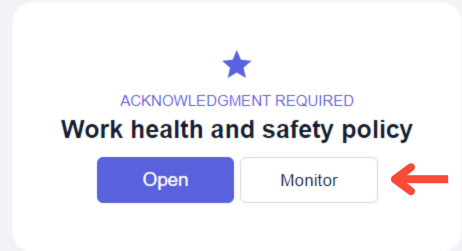
First, access the web version of Ommnio and search for the acknowledge message. You’ll find it in the group you sent it to. If you are the chat group administrator, the message will look like this for you:
-
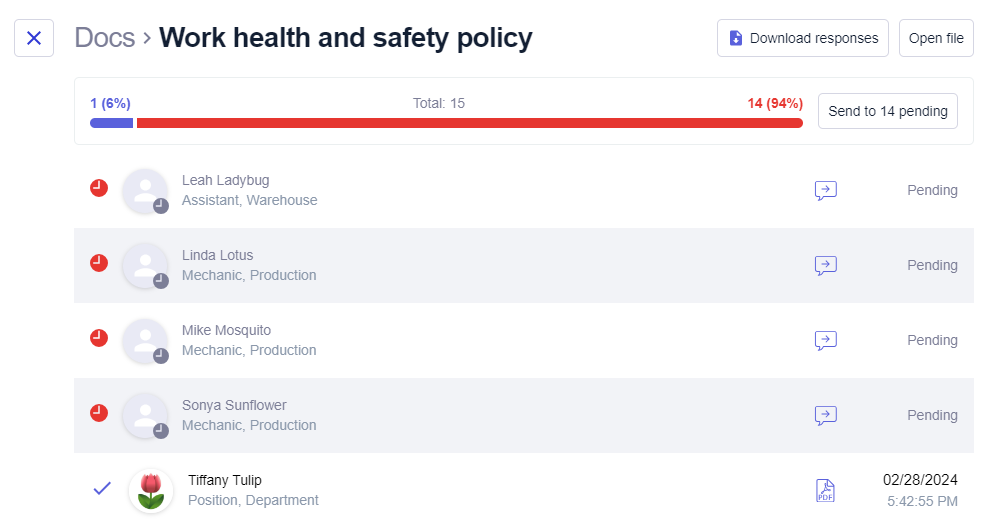
Click on "Monitor" to view the delivery statistics. A screen like this will open:
-
As you can see, the users who have confirmed the reading are listed, with the date and time of confirmation shown on the right. Pending users are marked with a red clock.
-
Click on the “Send to pending” button to send a push notification with the acknowledgment request again to all pending users. If you prefer, you can also notify them one by one using the “Send again” button.