
The visibility of a user’s data in Ommnio depends on who is viewing it—administrators, the user themselves, or other users. Here’s how access to information works in each case:
👨💻 What Account and Team Administrators Can See
All user data entered during account creation is visible to administrators via the “Users” tab in the web version of Ommnio.
- Account Administrators: Can view and manage all users.
- Team Administrators: Can view and manage only users within their assigned teams.
Fields visible to all administrators:
- Name*
- Surname*
- Position*
- Area*
- Phone or/and Email, if the company provided them when creating or editing the user
- Location (optional)
- Notes
- Related to
- Code
- ID (admins will see that an ID is present -displayed as ******-, but the actual value is encrypted and not visible).
- Language
- Work schedule (default: 9–17h)
- Time zone (account default)
- Tags
- Teams
- Groups
- Mandatory reading or signed documents
- Profile picture (if uploaded)
IMPORTANT:
If a user was created using a phone number or email, it will be visible to admins. If the user joined via a QR code or link, the number/email will not be visible—even if the user later entered it during registration.
👤 What Users Can See About Themselves
In the Settings section, users can see most of the data provided by the organization.
Visible fields (editable fields marked with *):
- First name*
- Last name*
- Position
- Area
- Location (if available)
- Work schedule*
- Time zone*
- Profile picture*
- Acknowledge messages
- Preferred language settings*
The user will never be able to see the Tags that the Administrator used to facilitate the classification and ordering of users, nor their code or the "Related to" field.
They will be able to see and modify their schedule, time zone, and profile picture. They can also configure the language they want to use in Ommnio.
👥 What Users Can See About Their Colleagues
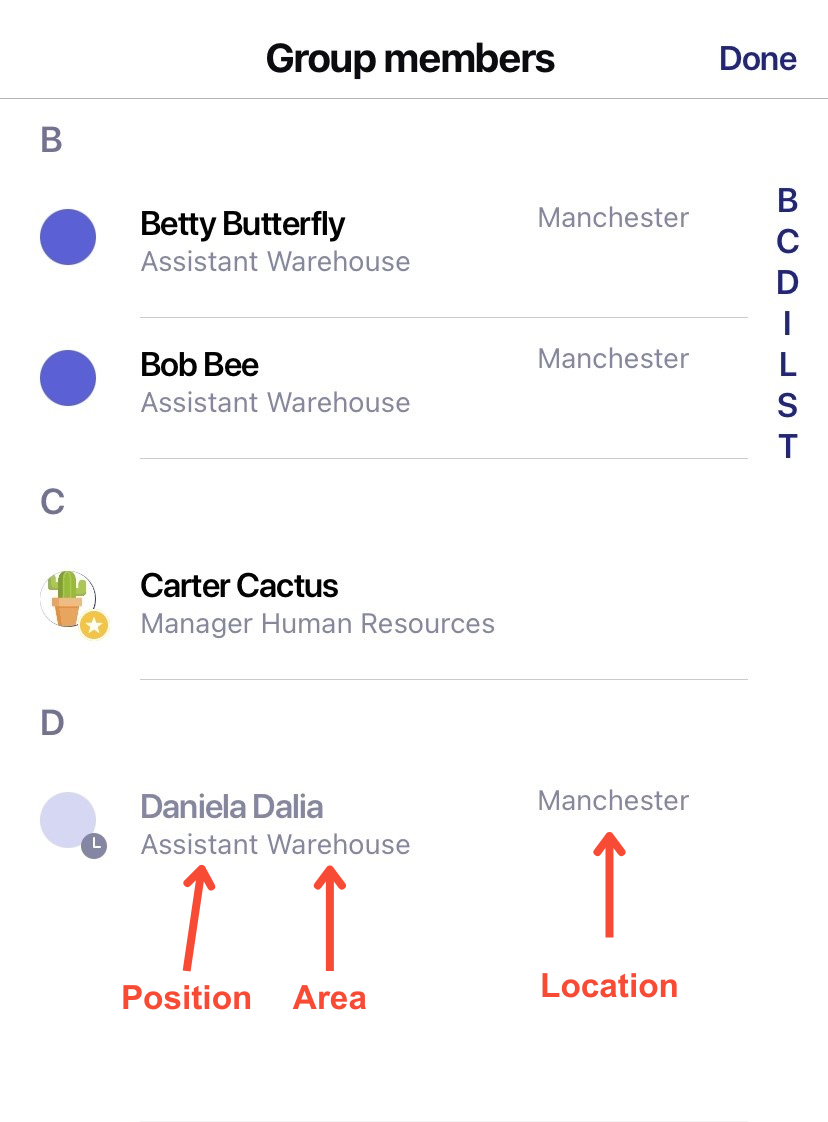
Users cannot browse full profiles, but they can view limited information of others in their groups or teams:- First name
- Last name
- Position
- Area
- Location (optional)
- Profile picture (if uploaded)
- They can see group members via the member list or a contact directory if enabled
- ✅ Tip: For privacy compliance, only share the data truly necessary for internal communication.